
The Sign Pack (TSP) is a design services company built for sign shops. Their team includes experienced designers and sign-industry professionals who offer design production, technical drawings, production files, and presentation proofs. The CoreBridge integration with The Sign Pack allows you to send design work directly from an Order or Estimate, eliminating duplicate data entry and keeping your workflow connected.
Getting started is handled by The Sign Pack. After they set up your account and send credentials, you connect those credentials in CoreBridge and submit design requests from an Order or Estimate.
For more information about The Sign Pack's services or to schedule a discovery session, visit thesignpack.com, use their CoreBridge page at thesignpack.com/corebridge, or contact their team at customerservice@thesignpack.com.
Table of Contents
How the Integration Works
The Sign Pack integration connects CoreBridge to your Sign Pack account so you can submit design requests from an Order or Estimate. When you start a request, CoreBridge sends your project briefing details and line items to The Sign Pack. Once a draft is created, CoreBridge saves a link to it so the connection is maintained if you return to that document later.
You start the request in CoreBridge. Proofs, revisions, approvals, and file delivery continue in The Sign Pack portal, based on your subscription or credit package.
Before You Begin
Complete these items before you send work from CoreBridge:
- The Sign Pack integration must be licensed for your shop. If you do not see The Sign Pack under Management Module / Global Settings / Services or on the Integrations tab of an Order or Estimate, contact CoreBridge Support.
- You need an active Sign Pack account. The Sign Pack creates that account and sends login information to you.
- An owner or manager enters those credentials in CoreBridge. See Connecting The Sign Pack in CoreBridge.
Getting Started with The Sign Pack
Onboarding is led by The Sign Pack. CoreBridge does not create your Sign Pack account or choose your design package. Work with The Sign Pack first, then connect the credentials they send you.
- Schedule a discovery session with The Sign Pack. Visit thesignpack.com, use thesignpack.com/corebridge, or email customerservice@thesignpack.com.
- The Sign Pack creates your account and sends login information to you.
- Select your package and payment method with The Sign Pack.
- Complete onboarding meetings with The Sign Pack. This typically takes 1 to 2 weeks so they can capture your requirements and workflow.
- After kick-off, you are ready to use The Sign Pack for design work. Enter the credentials they provided in CoreBridge.
- Design requests start in CoreBridge. Proofs, revisions, and production files are managed in The Sign Pack portal.
Connecting The Sign Pack in CoreBridge
Use the API URL, username, and password that The Sign Pack sent you. An owner or manager who can open Services enters the shop-wide connection.
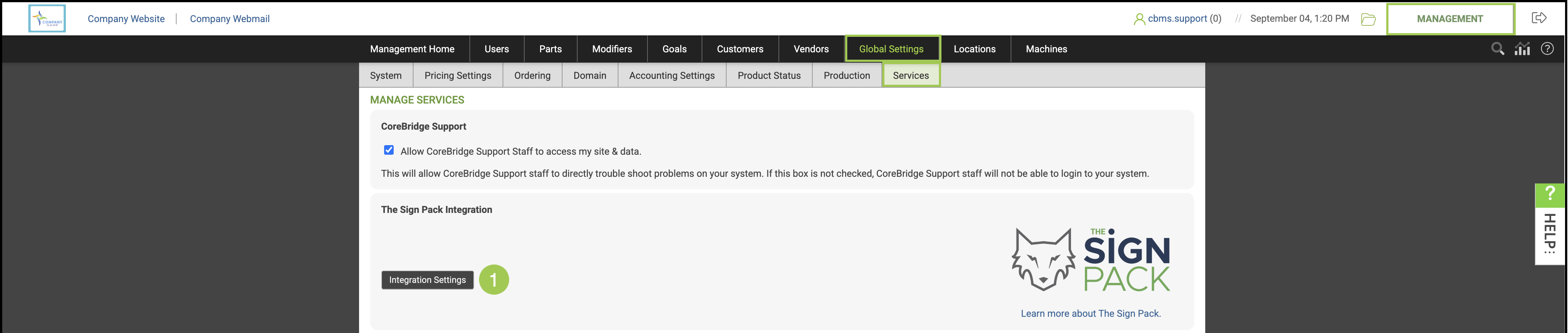
Navigate to Management Module / Global Settings / Services.
1. Find The Sign Pack Integration and open Integration Settings.
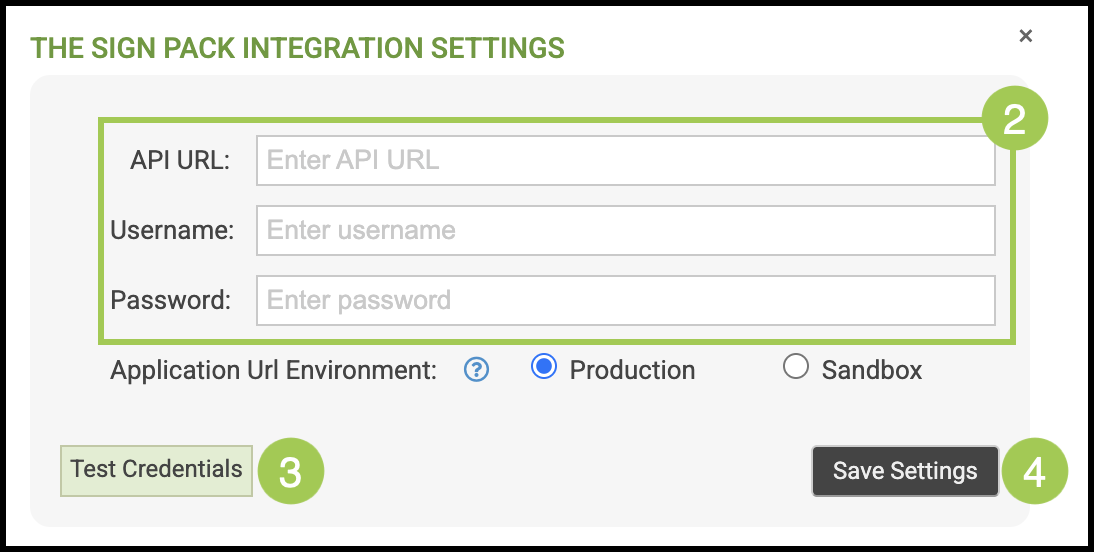
2. Enter the API URL, Username, and Password from The Sign Pack.
Note: The API URL uses the Sign Pack subdomain they assign. That subdomain is often different from your CoreBridge site name. If Integration Settings includes an environment option, select the environment The Sign Pack gave you.
3. Click Test Credentials to confirm CoreBridge can connect.
4. Click Save Settings.
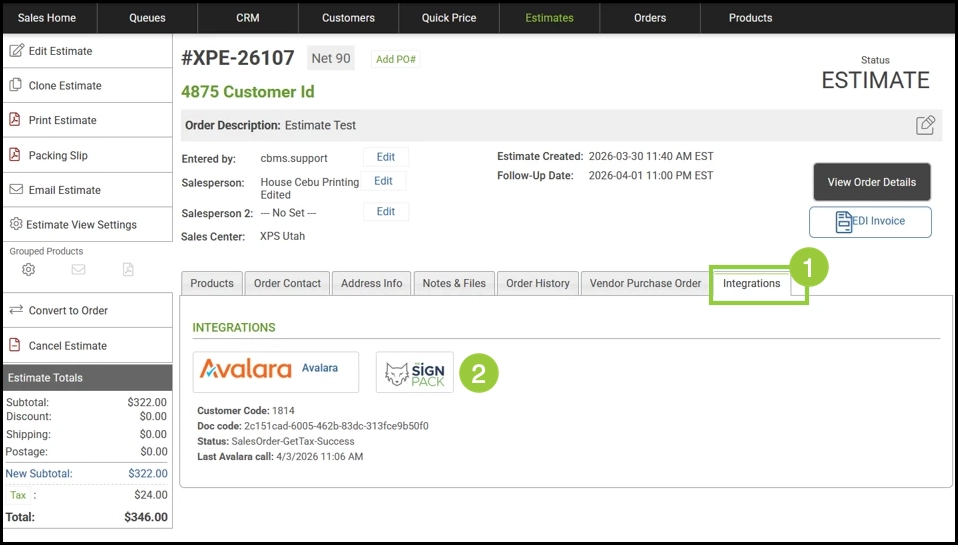
The Integrations tab on an Order or Estimate shows The Sign Pack after the feature is licensed and settings have been saved successfully.
You can also save your own Sign Pack login on the Integrations tab of your user record. When that is set, CoreBridge uses your Sign Pack identity for the requests you submit. If it is not set, CoreBridge uses the shop-wide credentials from Services.
Using The Sign Pack
The Integrations tab on any Order or Estimate is where you start a design request. The Order Design wizard walks you through entering your project details and mapping your line items to Sign Pack products.
Open the Order or Estimate in CoreBridge.
1. Select the Integrations tab.
2. Click The Sign Pack.
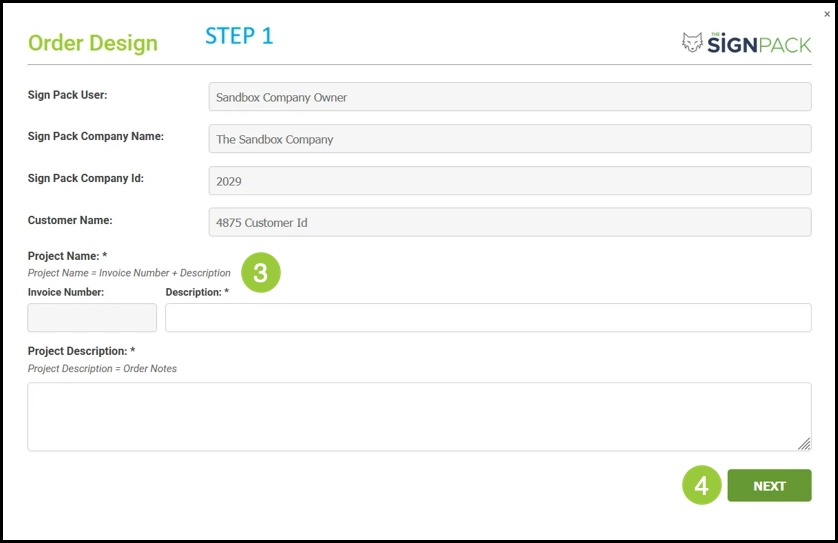
3. Enter your project briefing details and design needs.
4. Click Next.
5. Search for and map your CoreBridge line items to the corresponding Sign Pack products.
Note: If a draft already exists for this document, the wizard notifies you before continuing.
6. Click Submit to create the draft in The Sign Pack.
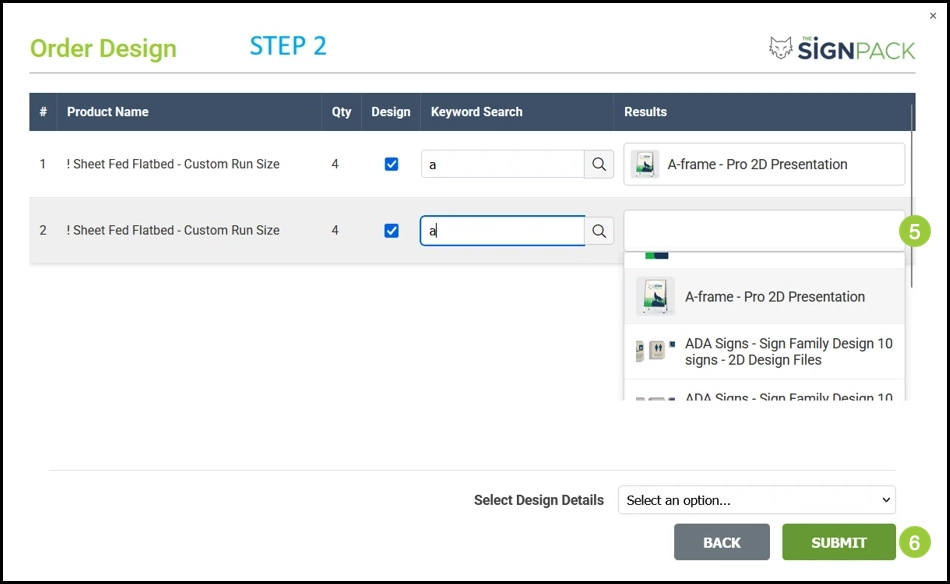
After submitting, you continue the review and approval process within The Sign Pack portal, including proofs, revisions, and file delivery.
Frequently Asked Questions
1. How do I get started with The Sign Pack?
Answer: Contact The Sign Pack to schedule a discovery session. They create your account, send login information, and walk you through package selection and onboarding. After that, enter the credentials they provided in CoreBridge.
2. Who sends me Sign Pack credentials?
Answer: The Sign Pack sends credentials to you after they set up your account. An owner or manager then enters them in CoreBridge.
3. Where do I enter Sign Pack credentials in CoreBridge?
Answer: Shop-wide credentials are entered under Management Module / Global Settings / Services in The Sign Pack Integration. You can also save your own Sign Pack login on the Integrations tab of your user record.
4. Why don't I see The Sign Pack in CoreBridge?
Answer: The integration must be licensed for your shop, and settings must be saved successfully. If you do not see it under Services or on the Integrations tab, contact CoreBridge Support.
5. Can each employee use their own Sign Pack login?
Answer: Yes. Save a Sign Pack login on the Integrations tab of the user record. If a personal login is not saved, CoreBridge uses the shop-wide credentials from Services.
6. Where do I review proofs after I submit a request?
Answer: In The Sign Pack portal. CoreBridge creates the draft and keeps a link to it. Proofs, revisions, approvals, and file delivery continue in The Sign Pack.
7. Who do I contact for Sign Pack services versus CoreBridge?
Answer: Contact The Sign Pack for discovery, packages, credentials, design work, proofs, and their portal. Contact CoreBridge Support if The Sign Pack does not appear in Services or on the Integrations tab, or if you need help saving the connection in CoreBridge.
Support
If you do not see The Sign Pack under Services, or you need help saving credentials in CoreBridge, contact CoreBridge Support at support@corebridge.net.
For Sign Pack signup, packages, credentials, design work, and their portal, contact The Sign Pack:
a. Website: thesignpack.com
b. CoreBridge integration page: thesignpack.com/corebridge
c. Email: customerservice@thesignpack.com